Your Nexus, in every tab.

Download videos, snapshot posts, grab every image and copy any page’s HTML. One sleek sidebar that knows what you’re looking at.

ChromeEdgeFirefoxSoonOperaSafariSoon
How to install
Nexus Browser running on a desktop computer
Any websiteThe sidebar changes to suit the page.
One clickNo copying links into other sites.
FreeWith your Kapyari Labs account.

Everything you find.
One click away.

Nexus reads the page you’re on and puts the right buttons in front of you.

Video & music

Play it on Discord.
Or keep it.

On YouTube, Spotify or SoundCloud the sidebar shows the song you’re on. Queue it in your Nexus voice channel, save the audio, download the video or grab the thumbnail.

  • Play on Discord
  • Save audio
  • Download video
  • Thumbnails
  • Comment summaries
The Nexus sidebar on a music video
✓Added to the queue
Posts on X & Facebook

Any post,
picture perfect.

Turn a post into a clean snapshot card, open it in our post editor already filled in, or download its video and GIFs. Saved straight to My Nexus.

  • Snapshot tweet
  • Edit tweet
  • Video & GIF downloads
  • Post in Discord
The Nexus sidebar on a post on X
✓Snapshot saved
Ask Nexus

Ask any page
anything.

Get a two-sentence summary of an article, an email or a whole comment section, or ask your own question about the page. Powered by Nexus AI.

  • Summarise this page
  • Email summaries
  • Ask a question
  • Plus & VIP
Ask Nexus in the sidebar
✓Summary ready
Images

Every image.
One zip.

See every picture on a page in a tidy grid. Save one as PNG, JPG or WEBP, or take them all in a single zip. Converted right on your computer.

  • PNG, JPG, WEBP
  • Download all (.zip)
  • Background remover
  • Spotify artwork
Downloading images with Nexus
✓6 pictures saved
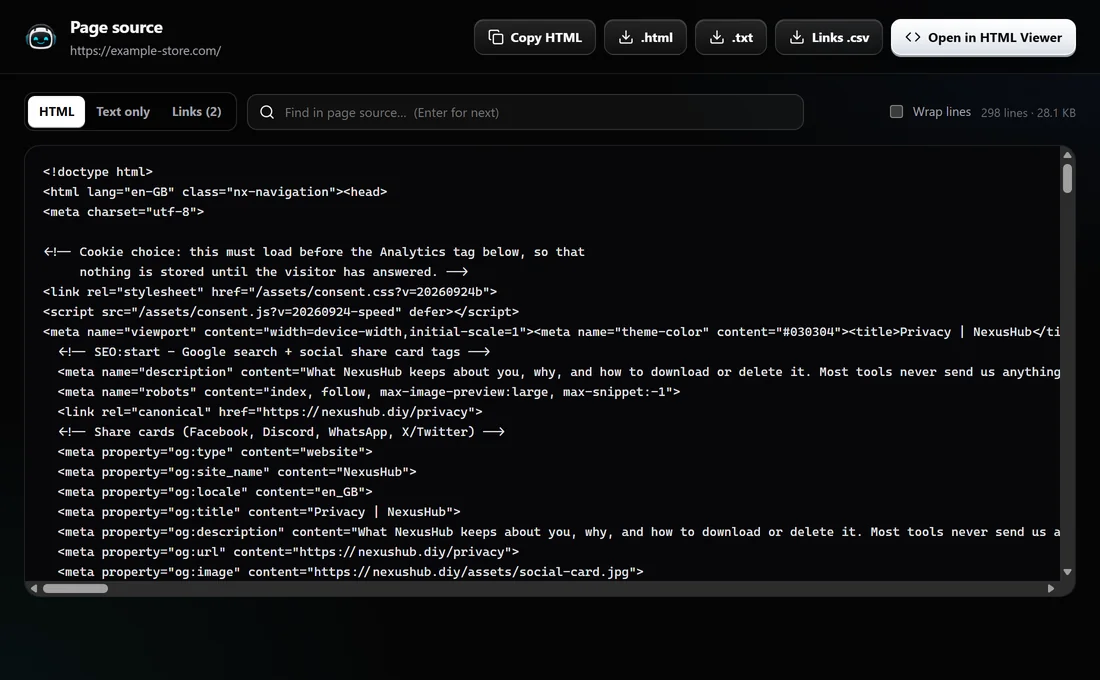
Page source

See how any page
is built.

One click opens a clean view of the page’s HTML. Search it, copy it, save it as .html or .txt, export every link to a spreadsheet, or open it in our HTML Viewer.

  • Copy HTML
  • .html & .txt
  • Links .csv
  • Open in HTML Viewer
The Nexus page source viewer

And there’s more.

Full-page screenshots

The whole page as one long, clean picture, made right on your computer. Or drag to capture just an area.

Send to Discord

Share pages, songs and posts as a neat card with your name.

Save links

Links and highlighted text go to Web saves in My Nexus.

Email summaries

One button on Gmail, Outlook and Yahoo sums up the email you have open.

Save playlists

Keep Spotify and YouTube playlists in your Music library.

Videos from any page

Nexus finds the videos on a page and lists them with their size, so you can save the one you want.

Private by design.

Only what you clickNexus reads the page you open it on. Never your history or cookies.
Nothing until you askNothing is sent to Nexus until you press a button.
Made on your computerScreenshots and image conversions happen locally.

Installed in under a minute

It’s on the Chrome Web Store. Three quick steps.

  1. Add to Chrome

    Open Nexus Browser on the Chrome Web Store and press Add to Chrome.

    Open the Chrome Web Store →
  2. Pin it

    Click the puzzle piece next to the address bar and pin Nexus so it’s always one click away.

  3. Connect your Nexus

    Pin Nexus, click it and press Connect My Nexus. Enter the NEX- code it shows you.

    Connected browsers →

Good to know

What can the extension see?

Only the page you click it on, or the link or text you choose to save. It never reads your browsing history or website cookies. On X it reads the posts on screen so you can pick one. Nothing is sent to Nexus until you press a button.

If you turn on Auto-follow, Chrome asks you to let Nexus read YouTube, X, Facebook, Spotify and SoundCloud pages, so the sidebar updates as you browse them. You can remove that any time in Chrome’s extension settings.

Ask Nexus reads text only when you press Summarise or Ask: your highlighted text, or up to about 4,000 characters of the page, comments or posts. That text and your question go to Nexus and our AI provider to write the answer. It isn’t used for training, and answers are kept for 7 days so asking again doesn’t use your allowance.

On webmail (Gmail, Outlook, Yahoo and others) Nexus never reads your inbox by itself. Only when you press Summarise this email does it read the one email you have open.

Full-page screenshots are made on your computer. Image downloads are converted on your computer too; a picture a website won’t share directly is fetched for you through Nexus. To improve Nexus Browser we count which buttons are used (feature name and version only), and these counts may be shared with Google Analytics.

Your connection stays on your browser, lasts 30 days and can be removed from connected browsers. Read the full privacy policy.

Is it free?

Yes. Saving, downloads, screenshots and Send to Discord are free with a Kapyari Labs account. Ask Nexus answers come with Plus (30 a month) and VIP (150 a month).

Will it update by itself?

Yes. Installed from the Chrome Web Store, Chrome updates it for you. The version number is shown in the extension’s settings.

Where do my saves go?

Songs and playlists go to Music, tweets to X, and links and text to Web saves, all in My Nexus.

Add Nexus to your Discord

Nexus is our all-in-one Discord bot: music for your voice channels, an AI assistant you can chat to, and handy admin tools like tidy channel names. Invite it to your own server in a couple of clicks.

Invite Nexus